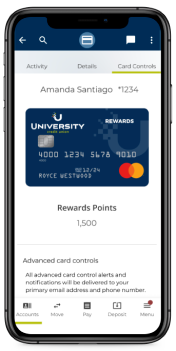





Card Manager is a free digital banking tool that allows you to control when, where, and how your UCU cards are used. You choose the settings that make sense for your needs - all while ensuring the safety of your accounts.
Card Manager lets you easily turn your cards on or off. This feature helps prevent unwanted purchases or withdrawals in the event your card is lost or stolen.
Merchant Category Controls
Prevent unwanted purchases at select merchants, or simply set limitations with the help of Card Manager.
Region Specific Controls
Set controls or alerts for when transactions occur outside specified regions, domestically or internationally.
Spending Limits
Sticking to a budget has never been easier. Use Card Manager to set spending thresholds for certain categories like groceries, gas, restaurants, and more.
Get Real-Time Alerts
Set up text, email, or push alerts so you know immediately when a transaction occurs.
Flexibility
You can conveniently set or modify card usage anytime, anywhere within online and mobile banking.
If you are not receiving any notifications from Card Manager, but have opted into them, you will need to make sure your online account is opted in. Log into your digital banking account and click ‘Menu’, then 'Alerts', and 'Security Alerts.' From here you can select if you want to receive email, text, and/or push notifications.
The Advanced Card Controls function allows you to select which transactions will be allowed or disallowed according to your preferences. These include merchant type, specific regions, transaction type, and spend limits.
The Advanced Card Alerts function allows you to set up alerts for all transactions or those you have blocked. Within Advanced Card Alerts, you can choose which types of transactions you would like to be alerted for; including merchant type, specific regions, transaction type, and spend limits.
Any cards that you currently have open with UCU will show up in Card Manager. Select the account associated with your card and then click 'Card Manager.'
If you have more than one UCU Account, you will have to create an online account for each in order to see your cards associated with that account. Even if you are able to see all the transactions in digital banking, in order to receive alerts or turn ON/OFF your other cards, you will need a separate online account log in.
If you turn OFF a card with recurring payments, they will still go through. Turning OFF a card will only block new transactions with new authorization requests.
This button allows you to turn your card off completely and all transactions will be blocked. Turning off your card is a good option if you have lost or misplaced your card.
Please lock your card immediately and call us at 800.UCU.4510 to let us know. We’ll assist you with more information on the merchant and/or help you dispute the transaction.
Card Manager requires you to have at least one alert channel selected to receive notifications; either text, email, or push notifications. You are also able to select more than one.
Giving our University Communities a financial advantage University Credit Union offers membership to employees, students and alumni of UCLA, Pepperdine University, Loyola Marymount University, Santa Clara University, Saint Mary's College, UC Irvine, UC Davis, UC San Diego, Georgia Tech, University of Texas at Arlington, Abilene Christian University, Mount St. Mary's University, Chabot College and Las Positas College, West Coast Conference Universities, Western Athletic Conference Universities, and other universities throughout California. UCU offers a variety of products and services including checking accounts, credit cards, home mortgages, auto loans, personal loans, commercial loans, insurance, investments, as well as digital banking.
Learn more about other UCU banking tools
Credit+
Get a clear picture of where you stand financially.
You are leaving ucu.org. The site you are about to visit is not operated by UCU. Please refer to the Terms of Use and Privacy Policy for this outside website as they may differ from UCU’s. UCU does not endorse and assumes no liability for any alternate website’s content and does not represent either the third-party or the member if the two enter into a transaction.